For independent personal trainers
Personal trainer software that keeps every client moving forward
Keep session notes, current focus, recurring appointments, packages, payments and follow-through together, so you start every session knowing where you left off.
Free for up to three clients. No card required. Then £8/month.

Every client arrives with different context
One client is working towards an event. Another is returning after time away. A third has one session left in a block. Another Session keeps the useful context and admin with the right client.
Before, after and between every session
Before the session
Know where you left off
Open the day, then open the client to read the previous note, the current focus, the next appointment and the package balance.
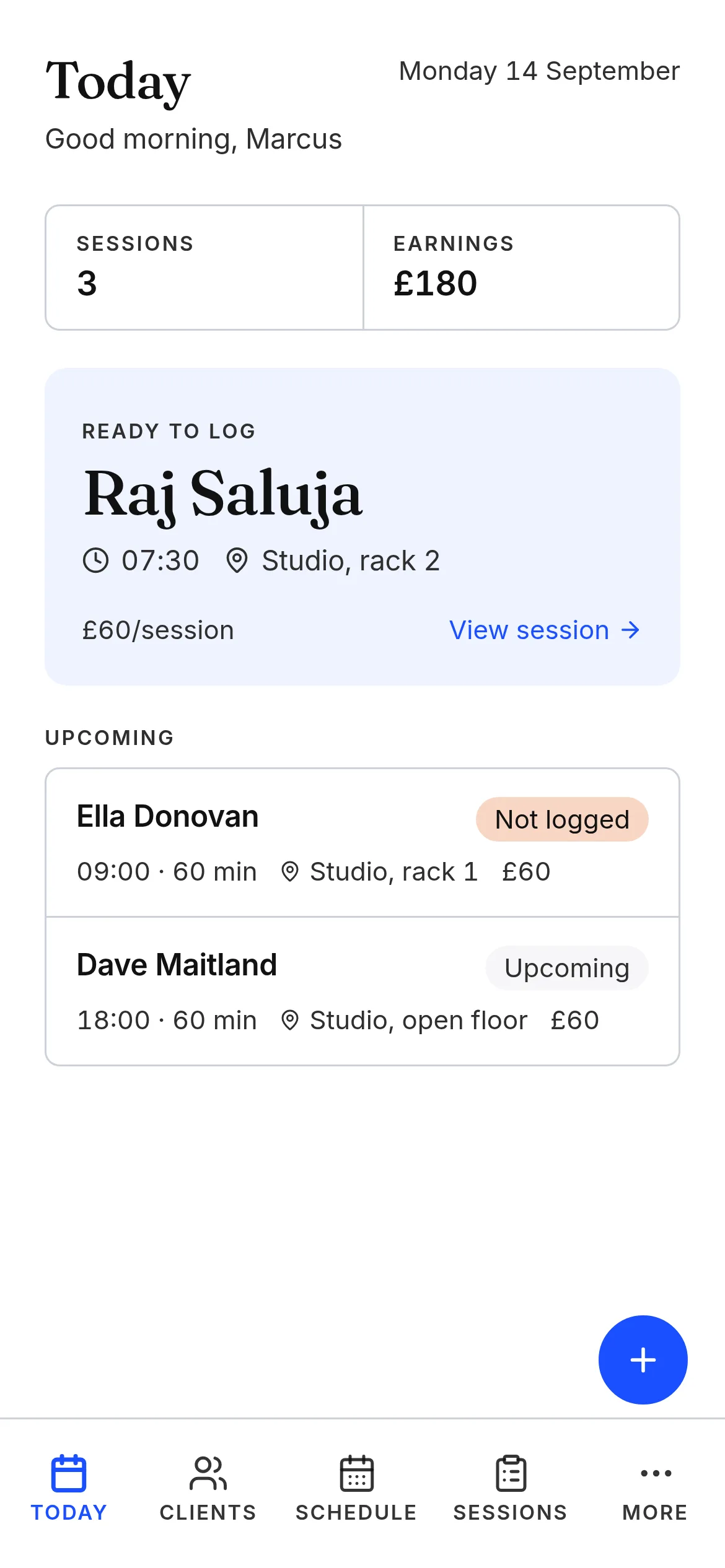
The day ahead: who is next, and which sessions still need logging.
After the session
Capture what matters
Write or dictate how the session went, what changed and what should become the focus next time.
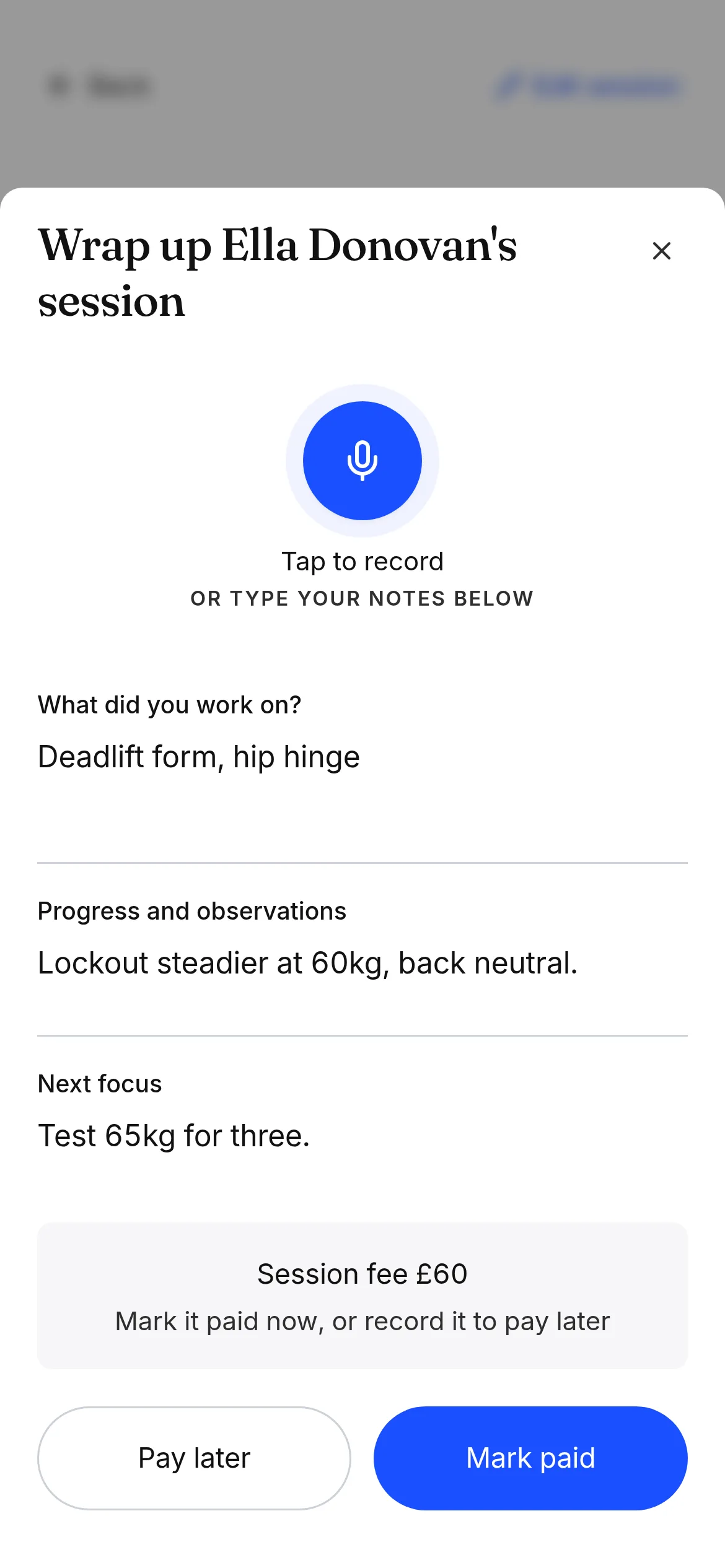
The wrap-up screen, ready for two lines typed or spoken.
Between sessions
Keep the work moving
Use Threads to see who needs attention, prepare reminders and turn session notes into a progress update you can review before sharing.
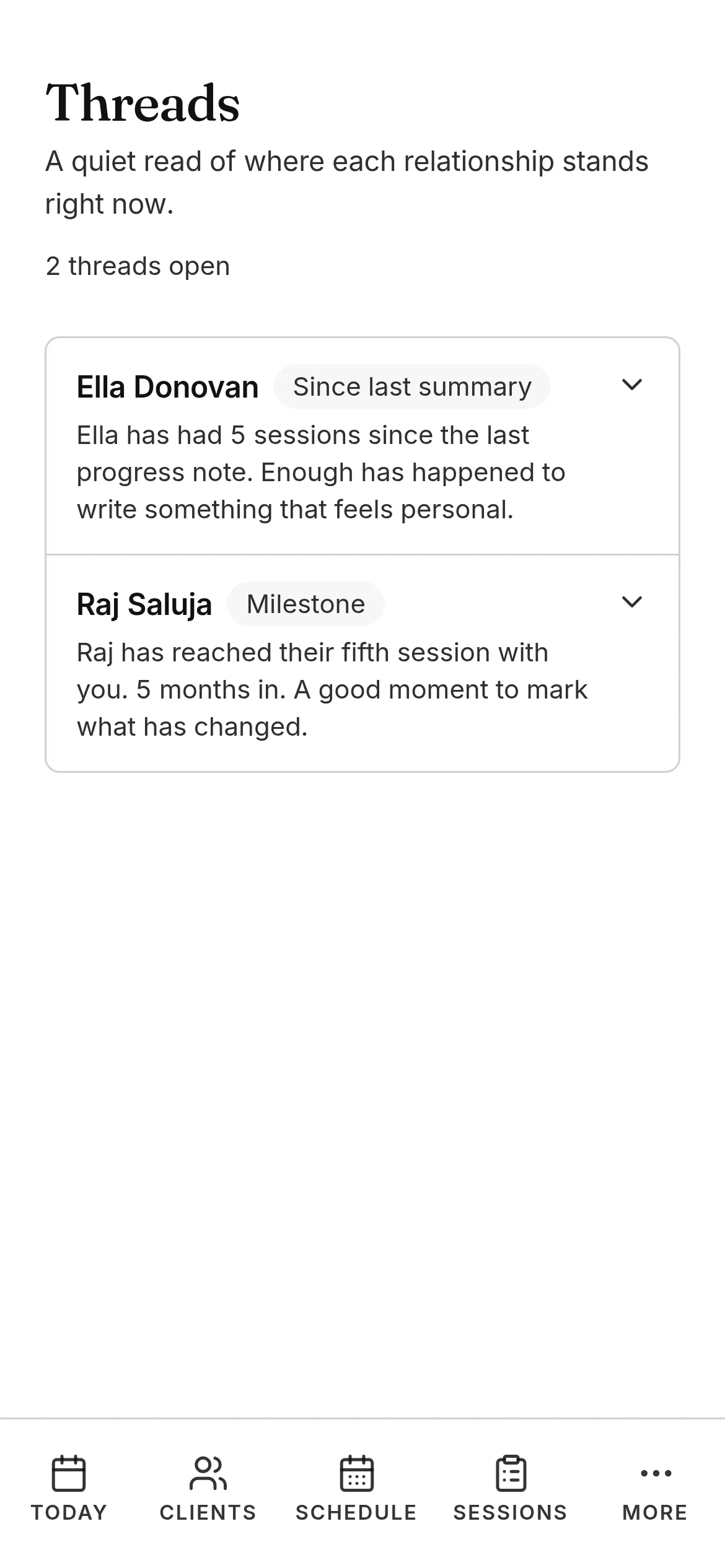
Threads: who has gone quiet, and what keeps coming back.


One client record
The full client picture, ready before they arrive
Bring their session history, current focus, upcoming appointments, package balance, payment status and progress into one useful record.
You can prepare properly without searching through messages, calendar entries and separate spreadsheets.

One client record: current focus, the last session note, and the next appointment.
Keep the longer story together
A goal or recurring focus rarely fits into one session note. Use Threads to connect relevant notes across several sessions and keep the wider picture visible.
- Preparation for an event
- A longer-term movement or confidence goal
- Building consistency
- A recurring area of focus
- A return after time away
Share progress without writing it all again
Build a progress update from the session notes you have already made. Review and edit it before sharing, so the client can see what has changed and what comes next.
You review every update yourself, and nothing is sent until you choose to send it.
Sessions, blocks and payments without the spreadsheet
Manage recurring appointments and reschedules, then track individual sessions, monthly arrangements or prepaid blocks in the same place.
See what each client has remaining, record what is owed and mark payments when you receive them. Another Session can prepare a request using your own payment link or bank details, but it does not process or detect payments.
Your sessions can appear in Apple Calendar, Google Calendar or Outlook through a one-way feed.
Fewer reminders to write by hand
Email reminders can send automatically. WhatsApp reminders are prepared with the session details ready for you to review and send.
Keep the training tools you already use
Continue using your existing workout, programming, booking and payment tools. Another Session gives you the client record, session context and follow-through around them.
Explore all coaching software featuresMade for independent personal trainers
A good fit if you
- Work independently with recurring one-to-one clients
- Want useful context before every session
- Keep session notes and track longer-term goals
- Sell individual sessions, monthly arrangements or packages
- Manage your own schedule, reminders and payments
- Want one simple system without gym-management complexity
Not the right fit if you need
- Workout programming or an exercise library
- Nutrition planning
- Body measurement or biometric tracking
- Client self-booking and live availability
- Class, gym-membership or facility management
- Built-in card processing
- Staff rotas or payroll
Every client. Every feature. £8/month.
Every feature is free for up to three clients. No card required. Continue with one monthly plan for unlimited clients and sessions.
FAQ
Frequently asked questions
What does personal trainer software help with?
It connects client records, sessions, notes, current focus, schedules, packages, payment tracking and progress, so you open a client and see where the training is up to rather than piecing it back together.
Does Another Session create workouts or training programmes?
No. It does not create workouts, prescribe exercise or provide an exercise library. You write the session notes and focus in your own words, and keep using whatever you already program with.
Can I use it with my existing fitness or booking software?
Yes. Another Session sits around the session itself, so you can keep your existing workout, booking and payment tools. There are no direct integrations with them.
Can I track session packages and remaining sessions?
Yes. Track individual sessions, monthly arrangements or prepaid blocks, and see how many sessions or hours each client has remaining.
Can I record and share client progress?
Yes. A progress update is built from the session notes you have already made. You review and edit it before sharing, so nothing goes out automatically.
Can clients book their own sessions?
No. There is no client self-booking or live availability. You keep arranging sessions the way you do now, and Another Session holds the record around them.
Does Another Session process payments?
No. It does not process payments, connect to your bank or detect when someone has paid. It can prepare a request using your own payment link or bank details, and you mark a payment once you have received it.
Can I import my existing clients?
Yes. Paste a client list or upload a CSV, review every row, then import the clients you want.
Does it work on phone and laptop?
Yes. Another Session works in your browser on phone and laptop, with no app to install. Every feature is free for up to three clients, then £8/month for unlimited clients and sessions.
Keep reading.
The Best CRM for Personal Trainers in 2026.
A plain guide for the self employed personal trainer. What a CRM should actually do for a one trainer practice, what to skip, and how to find one that fits the way you work between sessions.
Read the guideGuideFitness Coaching Is a Relationship Business.
A plain guide for personal trainers and fitness coaches on why the programme is the easy part, and the relationship is what keeps a client for two years instead of two months.
Read the guideFrom the JournalWhen a client feels known
Being attentive means remembering what matters to a client without assuming you understand everything about them.
Read the postTry it with your next client
Every feature is free for up to three clients. No card required. Then £8/month for unlimited clients and sessions.
Free for up to three clients. No card required.